Technically StructuredBusiness systems
Business systems consulting← Back to Blacklight Resumes

Make the moving parts work together.

We design, build, and improve the systems behind your business, so your people can spend less time holding everything together.

Reviewed personally. Scheduled by invitation.
Clayton McDonaldFounder & lead consultant
From request to follow-throughIllustrative workflow
  1. IntakeCapture the request
  2. CRMKeep shared context
  3. SchedulingCoordinate the next step
  4. DeliveryFollow through
Context that carries forwardOne working record
Request
Captured
Owner
Assigned
Next step
Visible
Ownership and checks stay visible

Clear ownership and visible checks support the work from intake to delivery.

From an operating product to the systems inside it.

The work behind
the website.

A working system has to handle more than the happy path. Here are examples of the decisions, connections, and controls behind the work.

01 / Reliable processing02 / Scoped operations03 / Internal production tools
Blacklight Resumes / Document processing

The request has to survive the interruption.

A payment, a processing job, and an email are different parts of a service. Connecting them means deciding what happens when one part stops or gets retried.

  • Guarded job claims check the current state before work starts.
  • Retry handling records the next attempt and processing progress.
  • A request-specific delivery handoff connects the output to the email queue.

For a business, this is the difference between an automation that runs once and a workflow people can investigate and recover.

Explore Blacklight’s service safeguards
Inside the implemented workflowBlacklight Resumes
  1. 01
    Check before claiming

    The job’s state, attempt, and lock must still match.

  2. 02
    Keep a record of progress

    Work and failure paths leave a trace for the operator.

  3. 03
    Schedule a safe next attempt

    Retry handling accounts for ownership and exhausted attempts.

  4. 04
    Prepare the delivery handoff

    A request-specific key connects the output and queued notification.
Explanation of implemented processing and recovery controls. This is not a live request or a claim of guaranteed email receipt.
Blacklight Resumes / Partner operations

One program. Different responsibilities.

A shared workspace needs more than a login. People need the right account context, the right controls, and reports that respect the same boundaries.

  • Action-level permissions separate reporting, billing, users, and locations.
  • Report exports check role, entitlement, location, and cohort scope.
  • Dashboard and export summaries reuse the same reporting logic.

The value is a connected operating model: staff access, program capacity, and reporting designed to work together.

Inspect the interface example
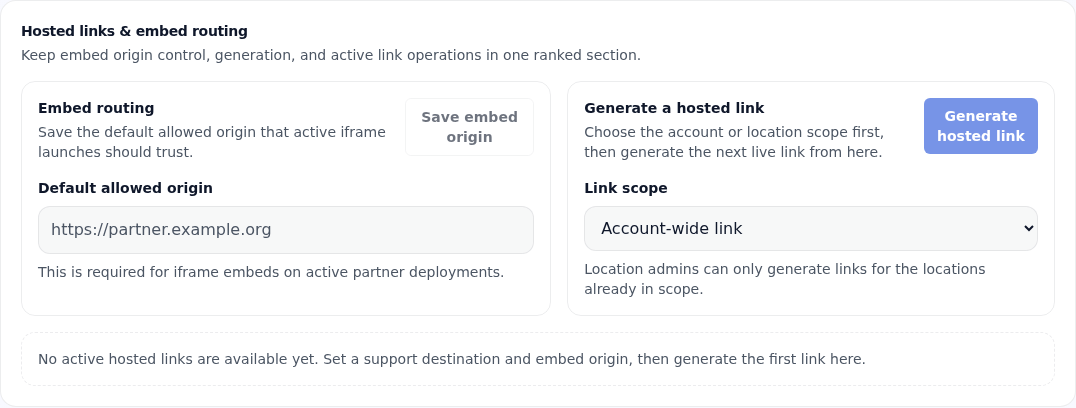
Actual product interfaceExample configuration
Blacklight partner portal controls for an allowed embed origin and account or location scope, using an example domain.
An existing Blacklight portal capture, shown with example configuration. Account-wide and location-scoped entry points are visible decisions in the interface, not hidden assumptions.
Local systems / Internal engineering example

Make repeated production work reviewable.

Founder-built video tooling separates reusable production logic from product-specific content. Structured demo inputs and ordered scene plans can be checked before a full render.

This brings the same systems thinking to internal work: define the input, check the handoffs, and keep human review explicit.

Implemented tooling controlsSource-backed example
  1. 01
    Declared inputs

    Validate the demo data and copy expected by the sequence.

  2. 02
    Ordered scenes

    Check scene order, layout bounds, and declared timing budgets.

  3. 03
    Separate review and publication

    A structural check or render does not grant publishing approval.

Internal tooling implementation, not a client endorsement or a claim that a particular video has been rendered, approved, or published. Structural checks support human review; they do not replace it.

These are owner-built product and internal-system examples. No client identities, confidential records, testimonials, or performance results are implied. Any client case study is shared only with permission.

Your team shouldn’t be the integration layer.

When the tools don’t connect, people fill the gaps. More software doesn’t always make the work easier.

The same information. Entered again.

Details move by copy, paste, and memory.

A lead arrives. The next step doesn’t.

Intake, follow-up, and scheduling live in different places.

The process works. Until it doesn’t.

Exceptions depend on one person knowing what to do.

Activity everywhere. No clear picture.

There is no shared view of the work or who owns the next step.

Build around
the business.

Start with the work. Choose the technology that serves it. Make the whole thing easier to run.

01

A clearer operating model.

Understand how the work actually happens, find the friction, and map a practical path forward.

Workflow discovery · Systems architecture · Process design

02

Tools that share context.

Make your CRM, intake, and scheduling work as a connected operation, with the right information in the right place.

CRM configuration · Intake & scheduling · API integrations

03

Work that moves forward.

Reduce repetitive handoffs with automation and purpose-built software. Use AI where it has a clear job and appropriate human oversight.

Workflow automation · Custom software · Practical AI

04

Confidence beyond launch.

Test the real workflow, plan the rollout, document how it works, and keep it maintained as the business changes.

Verification · Deployment · Ongoing support

Understand first.
Build deliberately.

A clear system, a defined scope, and evidence that the real workflow works. Verification is part of the delivery.

  1. 01

    Discover

    Walk through the real workflow, including the awkward parts. Identify the constraints, people, tools, and decisions that matter.

  2. 02

    Blueprint

    Define the system, priorities, ownership, and boundaries. Agree on what success looks like before implementation begins.

  3. 03

    Build & connect

    Deliver a focused scope using the tools that fit. Keep changes reviewable and account for the work already in motion.

  4. 04

    Verify & hand over

    Exercise the workflow and its failure paths. Document the system, plan deployment, and agree on ongoing support.

Clayton
McDonald.

Founder & lead consultant

The person thinking through the system is also the person building it.

I built Blacklight Resumes as a production software service, and I bring that same hands-on approach to consulting: understand the business, make the tradeoffs explicit, and follow the work through implementation.

You’ll work directly with me to define the problem, shape the system, and decide what should happen next.

Clarity before
commitment.

A conversation first. A defined plan next. Implementation when the scope makes sense.

First, a conversation

The fit call.

A free 20–30 minute conversation to understand the problem and decide whether discovery is the right next step.

FreeBy invitation after review
Then, a working plan

The Systems Blueprint.

A documented view of the workflow, its constraints, the recommended system, and a prioritized implementation scope.

The amount paid is credited once toward your first implementation engagement based on that Blueprint, capped at that engagement’s fee. Timing and eligibility terms are agreed in the proposal.

From $1,500Defined scope, agreed upfront
When you’re ready

Build. Connect. Maintain.

Implementation is quoted separately against the agreed scope. Ongoing support is available when appropriate.

Project-basedProposal before work begins

A few useful answers.

Who is this for?

Small and midsize organizations whose operations have grown more complicated than their tools. You may have a working business, a capable team, and too much manual work holding everything together.

Do we have to replace the software we already use?

Often, the best first step is to improve what is already there. Discovery identifies what to keep, what to connect, and where a custom solution would earn its place.

What comes with the Systems Blueprint?

A documented view of the current workflow, the main constraints, a recommended system design, and a prioritized implementation scope. The deliverables and boundaries are agreed before discovery begins.

How does the Blueprint credit work?

The fee you pay for your Systems Blueprint is credited once toward the first implementation engagement based on that Blueprint, up to that engagement’s fee. For example, if the agreed total is $7,000 and you have paid $1,500 for the Blueprint, the remaining balance is $5,500. Timing and eligibility terms are agreed in your proposal.

Can you support the system after it launches?

Managed support can be scoped when it fits the system and the engagement. Maintenance, responsibilities, response expectations, and any third-party costs are agreed separately.

What happens after I send an inquiry?

Clayton reviews the context first. If the project looks like a fit, he follows up by email to arrange a free 20–30 minute conversation. Sending an inquiry does not book a meeting or create a paid engagement.

What could
work better?

Tell me where the work gets stuck.

I review each inquiry personally. If there’s a fit, I’ll follow up by email to arrange a free call.

  1. Share a little context.
  2. I review the project.
  3. We arrange a conversation.

Please keep this high-level. Don’t include passwords, customer records, financial account details, or confidential documents.

Your details
The work

We use these details to review your project and contact you about this inquiry. No calendar access or paid commitment is created here. Need another way to reach us?